April 28, 2026
Built for Afterschool, Not Borrowed from the Classroom: How Our Powerful AI Tool Actually Works
Everyone is using AI. Your dentist is using it. Your nephew won’t stop talking about it. And yes, afterschool programs are using it too.
Most education focused AI tools were built for classrooms and handed to everyone else. Using one to plan afterschool programming is like asking a substitute teacher to conjure up a STEAM activity for mixed ages in a cafeteria with no materials list and fifteen minutes to prep.
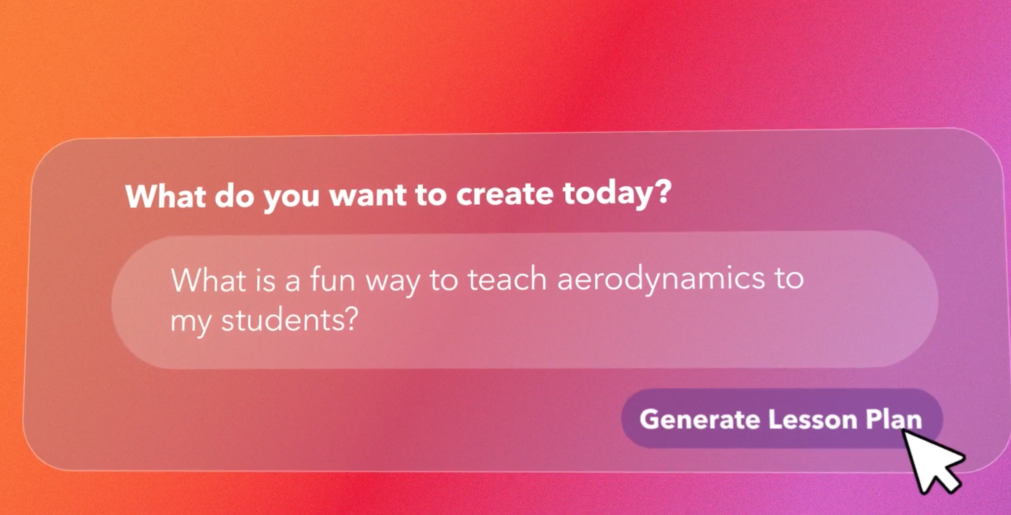
The AB Studios AI Lesson Planner was built specifically for afterschool. Type a prompt, and get a full, state standards-aligned session plan in less than 2-minutes. No lesson-planning experience required. No student data collected. Everything lives inside your AB Studios platform, alongside your content library and programming calendar.
How Is the AB Studios AI Planner Actually Different?
Here is what changes when AI is built for afterschool from the start.
| General AI Tools | AB Studios AI Planner | |
| Built For | Everyone | Afterschool staff at every experience level |
| Output Style | Academic lesson plans with objectives | Turnkey, consistently formatted sessions any staff member can walk in and run |
| Standards Alignment | Inconsistent, requires manual checking | State standards-aligned every time |
| Student Data | May collect or use student data | No student data collected, ever |
| Prompt Style | Requires structured, specific input | Type it the way you would actually say |
| Where It Lives | Separate from your program tools | Connected to your content library and programming calendar |
| Content Source | Pulls from general internet training data | Built on afterschool-specific content and pedagogy |
| Prep Time | Depends on how much editing it needs | Less than 1-minute. Ready to run as-is |
The Questions We Get Most Often:
Can’t I just tell ChatGPT to write it for afterschool? You can. But it still does not know your room, your staff, or what actually works when students are done being in school for the day. You will spend more time editing the output than it would have taken to plan the session yourself.
What do I actually type in? Whatever you would say out loud. “Fourth graders, engineering through fashion.” “Something active for mixed ages on a Friday.” “Grades 4 through 6, teamwork challenge, recycled materials, 30 minutes.”
What does the output actually include? A turnkey, step-by-step lesson with materials guidance, scripts, and a reflection prompt. Everything your staff needs to walk in and lead a strong session without winging it. You’ll get a consistent and deliverable format every single time.
Is it really standards aligned? Every time. Automatically. You do not have to check it, adjust it, or explain it to a grant funder.
How long does it actually take? About two minutes. Type your prompt, hit generate, and you have a full session plan before your coffee gets cold.
What if my staff have no teaching background? That is exactly who we built it for. The output is written in plain language with clear steps anyone can follow. No education degree required.
Does it work for mixed ages? Yes. Most afterschool programs do not have the luxury of perfectly sorted grade levels, and neither does our planner. You can specify age ranges, mixed groups, or whatever your program actually looks like.
How does it connect to the rest of AB Studios? It plugs directly into your content library and programming calendar, which includes drag-and-drop scheduling across day, week, and month views. Everything lives together so your whole team is working from the same page.
What if I want to customize the output? You can adjust, edit, and build on anything it generates. Think of it as a strong first draft your staff can actually use, not a rigid template they have to work around.
Does it replace my staff? Not even close. It gives them a better starting point so they spend less time preparing and more time actually connecting with students.
Does it collect student data? Never. The platform has no student-facing features and no student accounts. There is nothing to collect because students never touch it. AB Studios collects limited staff account information, specifically name, email, and role, for authentication and platform access. That’s it.
How It Actually Works Under the Hood
The AB Studios AI Lesson Planner runs on a coordinated AI system designed specifically for afterschool. When you type a prompt, the planner takes four things into account: subject, grade level or age range, your state, and session duration. Behind the scenes, our system helps shape that input into something staff can actually use. It applies afterschool-specific guidance, standards alignment, and safety guardrails before anything reaches your team. No personal information of any kind enters the AI system.
What comes out is a state standards-aligned session plan built for the real conditions of afterschool, not a generic classroom lesson that someone has to rework. And over time, that system is designed to get better in how it support educators, helping teams plan more effectively, lead with more confidence, and deliver stronger programming across sites.
The session plans you generate connect directly to your AB Studios content library and programming calendar. Everything your team needs lives in one place. No switching tabs. No copy-pasting into a separate document. No chasing down what each site is running this week.
Afterschool has always been handed tools built for someone else. We built something for you.
Ready to see it in action? Book a demo at abstudios.com and watch the quick overview here.

October 30, 2026
5 Ready-to-Run Gratitude Activities for…
September 28, 2026
How AB Studios Makes Afterschool…
September 1, 2026
5 Afterschool Norms That Keep…

May 21, 2026
Paper Aviation: AB Studios’ Hands-On…